A look inside the workbook
What it is and what it is for
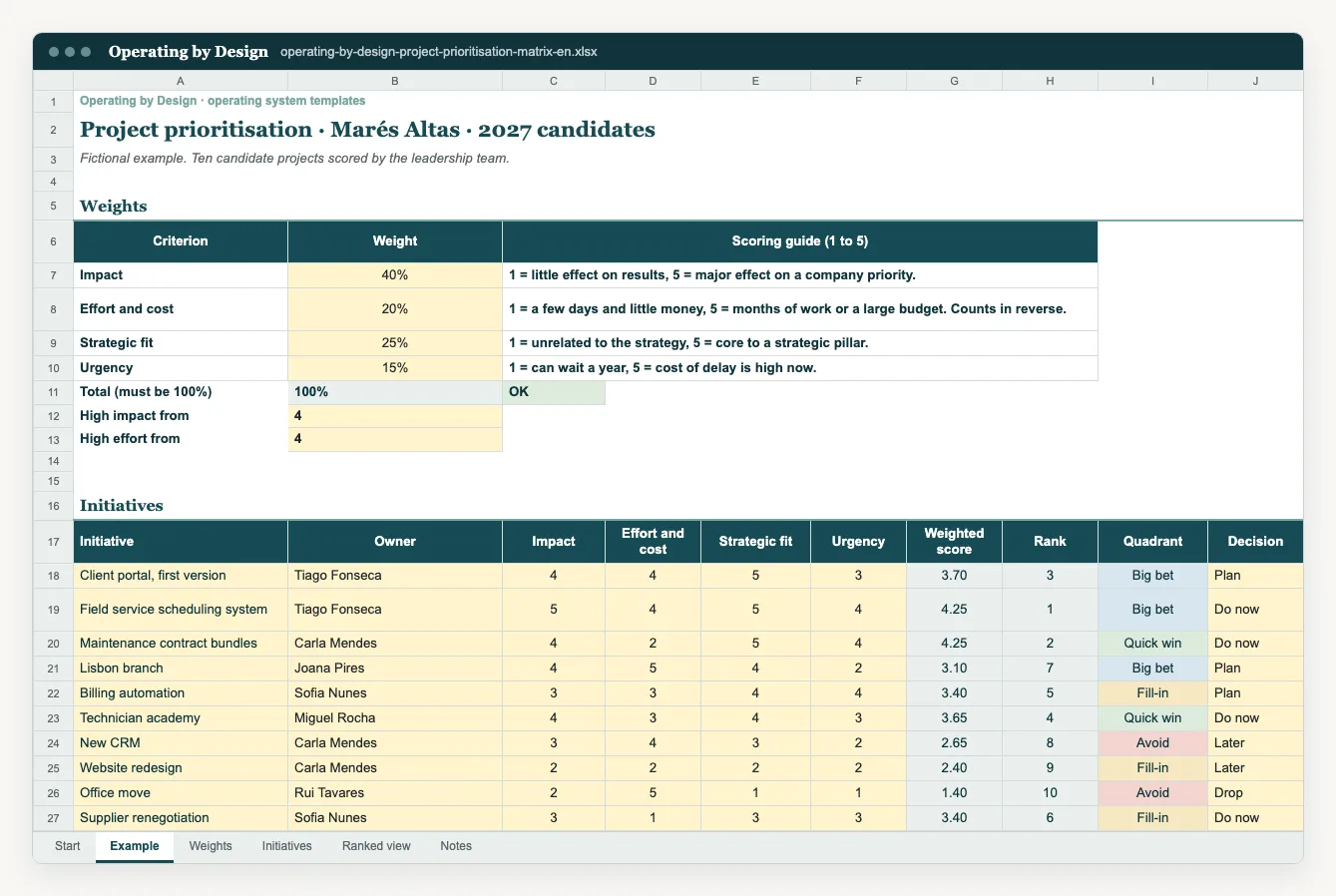
When there are more projects than capacity, the loudest voice tends to win. A prioritisation matrix makes the choice explicit: each initiative is scored on impact, effort or cost, strategic fit and urgency, with weights the leadership team can adjust. The template calculates the weighted score, ranks the initiatives and places each one in a quadrant, separating what moves now from what waits.
Who uses it and when
Founders, CEOs and leadership teams during annual or quarterly planning, and portfolio or operations leads managing a long list of projects. Scoring is done together, so the criteria are applied the same way to every initiative.
Use the matrix before annual planning and each quarter, and whenever a new initiative appears that is big enough to change the plan. Keep the weights stable through the year unless the strategy changes.
How to use the template
- 1.List every initiative on the table, including those already under way. Describe each in one sentence with the expected outcome.
- 2.Agree the weights for the four criteria before scoring anything. Changing weights after seeing the result is choosing the answer first.
- 3.Score each initiative in the yellow cells, using the scale described on the instructions sheet. Do it as a group and record the main assumptions.
- 4.Review the weighted score, rank and quadrant, which are calculated automatically.
- 5.Discuss any surprising results: they often reveal a different assumption rather than a calculation error.
- 6.Decide what goes ahead, what waits and what stops, given real capacity, and carry the decision into the roadmap or quarterly plan.
Data access and limitations
The matrix supports the decision; it does not make it. Scores reflect the assumptions of the people scoring. Record the reasoning behind the most debated scores so the decision can be revisited later. The Marés Altas example is fictional and its initiatives, scores and weights are not benchmarks. The file contains no macros.
Common questions
How does the weighted score work?
Each criterion gets a score and a weight. The template multiplies each score by its weight and adds the results, giving a score that can be compared across initiatives.
What are the quadrants for?
To read the balance between value and effort at a glance: high impact with low effort goes first, while low impact with high effort is a candidate to stop.
Can I change the criteria?
You can adjust the weights to reflect your strategy. Change the criteria only if the leadership team agrees, and apply the change to every initiative at the same time.
References and use
These are practical Operating by Design resources. Suggested cadences and quantities are starting points, not universal standards. References consulted on 16 October 2026:
Adapt the workbook for internal use in your organisation. Preserve the source attribution. Avoid unnecessary personal data.
From template to implementation
If the challenge needs more than a template, leadership alignment and a cadence that holds, see how we implement this with teams.
Explore the related service

